

Retrieval-Augmented Generation (RAG) has revolutionized how we build AI applications that can reason over custom documents and knowledge bases.
Building a RAG System without Vector Databases: PostgreSQL and Gemini Transformers
Retrieval-Augmented Generation (RAG) has revolutionized how we build AI applications that can reason over custom documents and knowledge bases. In this post, I'll walk you through a complete RAG architecture that combines Google's Gemini model with PostgreSQL's vector capabilities to create a powerful document Q&A system.
Why PostgreSQL for Vector Storage?
Before diving into implementation, let's understand why PostgreSQL makes an excellent choice for vector databases:
Operational Simplicity: If you're already running PostgreSQL in production, adding vector capabilities means one less service to manage, monitor, and scale.
Rich Query Capabilities: Combine vector similarity search with traditional SQL operations, enabling complex queries that mix semantic search with filters, joins, and aggregations.
Cost Efficiency: Leverage existing PostgreSQL infrastructure instead of paying for separate vector database services.
Hybrid Search: Seamlessly combine full-text search with vector similarity for more nuanced retrieval strategies.
Architecture Overview
Our RAG system follows a clean, six-phase workflow:
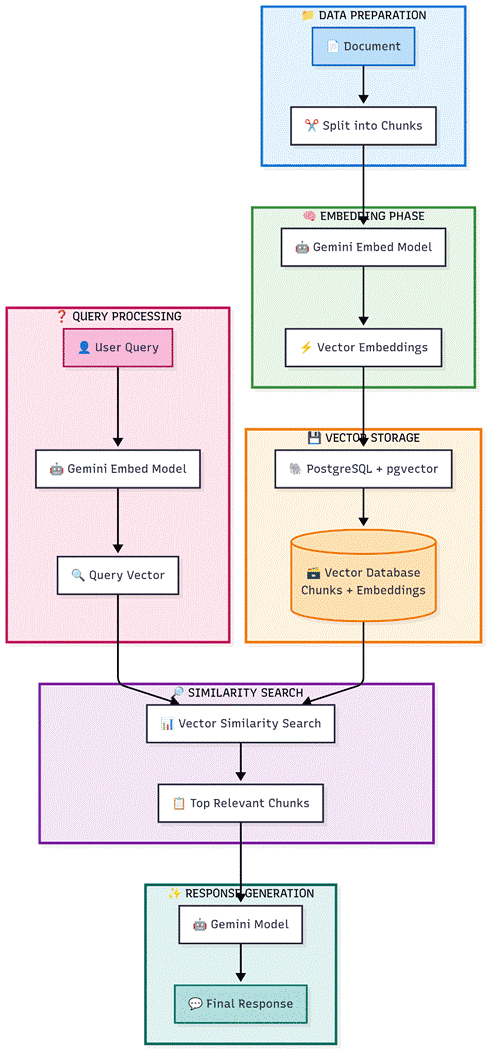
Phase 1: Data Preparation
The journey begins with raw documents that need to be processed:
Document Ingestion: Accept various document formats
Markdown Conversion: Standardize format for consistent processing
Intelligent Chunking: Split documents into meaningful sections while preserving context
Phase 2: Embedding Generation
This is where the magic happens:
Gemini Embedding Model: Convert text chunks into high-dimensional vectors
Semantic Representation: Each vector captures the meaning and context of the text
Consistency: Using the same model ensures embedding compatibility
Phase 3: Vector Storage
Efficient storage is crucial for performance:
PostgreSQL + pgvector: Leverage the reliability of PostgreSQL with vector capabilities
Scalable Storage: Handle millions of document chunks efficiently
ACID Compliance: Ensure data integrity and consistency
Phase 4: Query Processing
When users ask questions:
Query Embedding: Convert user questions using the same Gemini model
Vector Representation: Maintain consistency between storage and query vectors
Preparation: Ready the query for similarity search
Phase 5: Similarity Search
Find the most relevant information:
Vector Similarity: Use mathematical distance to find semantically similar content
Top-K Retrieval: Get the most relevant chunks (typically 3-5)
Performance: Leverage pgvector's optimized indexing for fast searches
Phase 6: Response Generation
Bring it all together:
Context Integration: Combine retrieved chunks with the user query
Gemini Generation: Use the language model to create coherent, accurate responses
Source Attribution: Maintain traceability to original documents
Why This Architecture Works
Unified Model Ecosystem
Using Gemini for both embedding and generation ensures:
Semantic Consistency: Embeddings and generation logic are aligned
Optimized Performance: Models are designed to work together
Simplified Deployment: Fewer API endpoints and model versions to manage
PostgreSQL as Vector Database
While specialized vector databases exist, PostgreSQL + pgvector offers:
Production Reliability: Battle-tested database with ACID guarantees
Ecosystem Integration: Easy integration with existing applications
Cost Effectiveness: No need for additional database infrastructure
Advanced Querying: Combine vector search with traditional SQL operations
Scalable Design
This architecture handles growth gracefully:
Horizontal Scaling: PostgreSQL can be scaled across multiple nodes
Efficient Indexing: pgvector provides HNSW and IVFFlat indexes for fast searches
Batch Processing: Document ingestion can be parallelized
Implementation Deep Dive
Database Schema
The foundation of the system is two PostgreSQL tables. First, enable the pgvector extension with CREATE EXTENSION IF NOT EXISTS vector. Then create a documents table with an auto-incrementing id, a title (VARCHAR 500), an optional source_path, and a created_at timestamp. This stores metadata about each ingested document.
The second table, document_chunks, is where the real work happens. Each chunk has a foreign key to its parent document, the chunk_text itself, a chunk_index to preserve ordering, an embedding column typed as vector(768) matching Gemini's embedding dimension, and a JSONB metadata field for storing additional context like page numbers or section headers.
For fast similarity search, create an HNSW index on the embedding column using the vector_cosine_ops operator class. The parameters m=16 and ef_construction=64 provide a good balance between index build speed and search accuracy for most use cases.
Storing Document Chunks
The ingestion pipeline has three stages. First, a chunking function splits the raw document text into overlapping segments. Using a chunk size of 500 words with a 50-word overlap ensures that no context is lost at chunk boundaries. The overlap is critical because relevant information often spans chunk edges.
Next, each chunk is passed to Gemini's embedding model (models/embedding-001) with the task type set to "retrieval_document". This tells the model to optimize the embedding for document storage rather than query matching. The result is a 768-dimensional vector that captures the semantic meaning of the chunk.
Finally, a store function ties it together: it inserts a record into the documents table, gets back the document ID, then iterates through each chunk generating its embedding and inserting both the text and vector into document_chunks. The entire operation is wrapped in a transaction and committed at the end to ensure atomicity.
Searching for Similar Chunks
When a user asks a question, the search process mirrors the storage process. The query text is embedded using the same Gemini model, but with task_type set to "retrieval_query" instead. This asymmetric embedding approach is key to Gemini's retrieval quality, as documents and queries are encoded differently to maximize relevance matching.
The SQL query uses pgvector's cosine distance operator to compare the query embedding against all stored chunk embeddings. The expression 1 minus the cosine distance gives a similarity score between 0 and 1. Results are ordered by distance (ascending) and limited to the top K results, typically 5. Each result includes the chunk text, the source document title, and the similarity score.
Generating the Final Response
The response generation function orchestrates the full RAG pipeline. It starts by calling the similarity search to retrieve the top 5 most relevant chunks. These chunks are then formatted into a context string, with each chunk labeled with its source document and similarity score for traceability.
The context is injected into a carefully crafted prompt that instructs Gemini to answer only based on the provided context and to explicitly say when the answer is not available. This grounding step is what prevents hallucination, the primary advantage of RAG over vanilla LLM queries.
The prompt and context are sent to Gemini Pro (gemini-pro) for generation. The response includes both the generated answer and a list of source documents with their similarity scores, enabling full auditability of where the answer came from.
Implementation Considerations
Chunking Strategy
The quality of your chunks directly impacts RAG performance:
Size Matters: Balance between context preservation and specificity
Overlap: Consider overlapping chunks to prevent information loss
Structure Awareness: Respect document structure (sections, paragraphs)
Vector Similarity Metrics
Choose the right distance function:
Cosine Similarity: Best for semantic similarity (recommended for most cases)
Euclidean Distance: Good for exact matching scenarios
Dot Product: Useful when magnitude matters
Performance Optimization
Key areas to monitor and optimize:
Index Configuration: Tune pgvector indexes based on your data size
Batch Operations: Process multiple documents efficiently
Caching: Cache frequently accessed embeddings and responses
Connection Pooling: Manage database connections effectively
Real-World Benefits
This RAG architecture delivers tangible value:
For Developers:
Rapid deployment using familiar PostgreSQL infrastructure
Consistent API patterns with Google's model ecosystem
Easy debugging and monitoring with standard database tools
For Organizations:
Accurate answers from proprietary documents
Reduced hallucination compared to standalone LLMs
Auditable responses with source traceability
Cost-effective scaling without specialized vector database licensing
For End Users:
Fast, relevant responses to complex queries
Ability to ask questions about specific documents or topics
Contextual answers that cite sources
Getting Started
To implement this architecture:
Set up PostgreSQL with the pgvector extension
Configure Gemini API access for embedding and generation
Create the database schema with the documents and document_chunks tables as described above
Implement the Python ingestion pipeline for chunking, embedding, and storage
Build the search and generation functions to handle user queries
Test with sample documents and optimize chunk sizes and top-K values based on your use case
Conclusion
This RAG architecture represents a practical, production-ready approach to building intelligent document Q&A systems. By combining Google's powerful Gemini models with PostgreSQL's reliability and vector capabilities, you get the best of both worlds: cutting-edge AI performance with enterprise-grade data management.
The beauty of this system lies in its simplicity and power. With just six clear phases, you can transform static documents into an interactive knowledge base that provides accurate, contextual answers to user questions.
Ready to build your own RAG system? The combination of proven technologies and modern AI capabilities makes this the perfect time to start building intelligent applications that truly understand your data.