

In the era of Generative AI, the quality and scale of data processing have become more critical than ever. While sophisticated language models and ML algorithms steal the spotlight, the behind-the-sce
Efficient Data Processing with Practical Parallelism in AI Workflows
In the era of Generative AI, the quality and scale of data processing have become more critical than ever. While sophisticated language models and ML algorithms steal the spotlight, the behind-the-scenes work of data preparation remains the unsung hero of successful AI implementations. From cleaning inconsistent formats to transforming raw inputs into structured information, these preparatory steps directly impact model performance and output quality. However, as data volumes grow exponentially, traditional sequential processing approaches quickly become bottlenecks, turning what should be one-time tasks into resource-intensive operations that delay model training and deployment. For organizations working with moderate to large datasets—too small to justify a full Hadoop or Spark implementation, yet too unwieldy for single-threaded processing—finding the middle ground of efficient parallelism has become essential for maintaining agile AI development cycles.
Task at Hand
In the technical products sales domain, we faced a classic challenge: building a RAG-based GenAI chatbot capable of answering technical queries by leveraging historical customer service email conversations. Our analysis showed that approximately 65% of customer inquiries were repetitive in nature, making this an ideal candidate for automation through a modern GenAI solution.
The foundation of any effective AI system is high-quality data, and in our case, this meant processing a substantial volume of historical email conversations between customers and technical experts. As is often the case with real-world AI implementations, data preparation emerged as the most challenging aspect of the entire process.
Our email data resided in two distinct sources:
MSG file dumps: These are Microsoft Outlook's proprietary email storage format files (with .msg extension), which encapsulate not just the email text but also formatting, attachments, and metadata in a binary structure. Our archive contained hundreds of thousands of these files spanning several years of customer communications.
Outlook inbox threads: These were ongoing conversation threads stored directly in dedicated customer service Outlook inboxes, which provided more recent interactions organized by conversation topic.
Together, these sources comprised approximately 1 million email threads with a total data footprint of around 400GB. The sheer volume made even simple operations time-consuming when approached sequentially.
Our data preparation task involved multiple steps:
Extracting plain text and relevant attachments from the proprietary formats
Implementing basic pre-processing to filter out irrelevant emails based on certain patterns
Removing spam and promotional content that had made it through to the service inboxes
Applying email-specific cleaning to make conversation threads cohesive
Preserving the relationship between emails and their relevant attachments
Loading the processed data into a database in a structured format suitable for retrieval
The end goal was to transform this raw, unstructured data into a clean, structured corpus that could serve as the knowledge base for our RAG (Retrieval-Augmented Generation) system. With properly processed data, the chatbot would be able to retrieve relevant historical conversations and generate accurate, contextually appropriate responses to customer inquiries.
Let's examine the data processing implementation we initially developed to handle these email sources.
Data Processing Pipeline
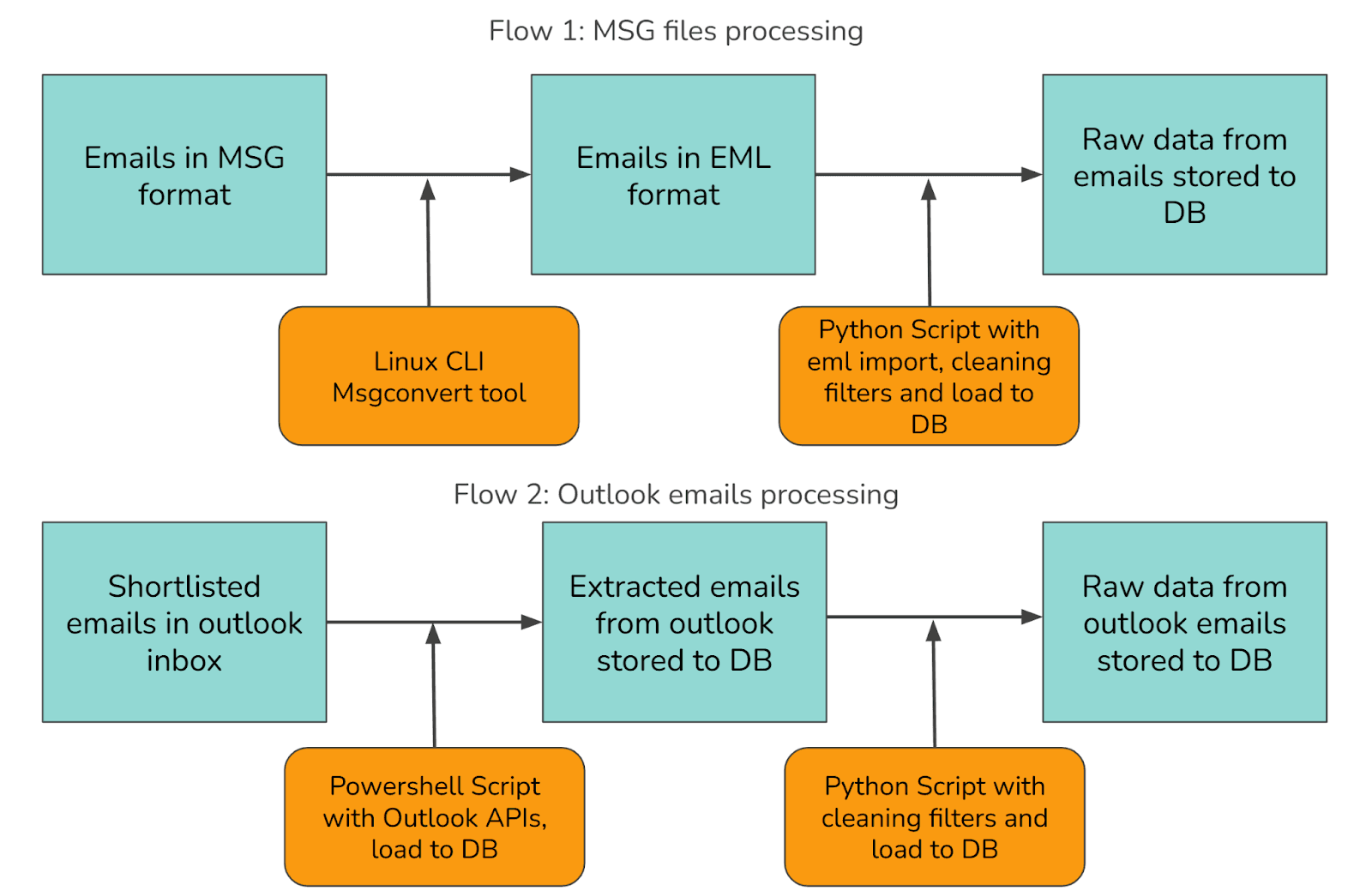
Our approach to processing the email data required handling two distinct sources through separate workflows, as illustrated below:
Data Sources
We needed to process emails from two primary sources:
Historical Archives: Email threads stored as .msg files in network storage
Active Communications: Ongoing conversations in Outlook inboxes
Solution Architecture
To handle these diverse sources efficiently, we developed two parallel processing flows:
Flow 1: MSG files processing
Step 1: MSG to EML Conversion
Since the MSG format is proprietary to Microsoft, we couldn't directly load it in a Python script for content extraction. The parsers in scripting languages weren't reliable enough. We found a Linux CLI tool called msgconvert that converts MSG files into the open EML format.
The usage is straightforward: you call msgconvert with the input MSG file path and specify an output directory for the resulting EML file. The tool handles the binary format parsing and produces a standards-compliant EML file that Python's email library can easily read.
Step 2: EML Parsing
The sequential EML parsing script follows a simple pattern: it collects all EML files from a directory, then iterates through them one by one. For each file, it opens and parses the email content using Python's built-in email library, extracts the relevant fields (sender, recipient, subject, body, date, and attachments), applies cleaning rules to normalize the text, and saves the result to a database.
This approach is straightforward but can be slow when dealing with many files, as each file must be fully processed before moving to the next one.
Flow 2: Outlook emails processing
Step 1: Extract Outlook Emails via PowerShell
Outlook provides programmatic access via PowerShell, which is well-suited for navigating the Microsoft ecosystem. The extraction script connects to both the Outlook COM object and a SQLite database, then retrieves all emails from a specified folder. It processes each email one by one in a single thread, extracts the email content including subject, body, sender, recipients, date, and attachments, then saves each record to the database before moving on to the next email. You can find the Outlook APIs documentation for reference.
This approach is simple to implement but can be slow for processing large mailboxes as it handles each email sequentially.
Step 2: Data Cleaning with Python
After extracting the raw email data from Outlook, we process it through a Python cleaning script similar to the one used for EML parsing. This script handles common email-specific cleaning tasks including:
Normalizing inconsistent text encodings
Filtering out auto-generated messages and spam
Sanitizing HTML content
Extracting plain text from formatted emails
Reconstructing conversation threads based on headers
This sequential cleaning process faces the same performance limitations as our earlier EML parsing approach, with each email being processed one at a time.
The Bottleneck: Inefficiencies in Sequential Processing
Sequential processing creates significant bottlenecks when handling large datasets. In our case with approximately 1 million emails, the limitations become quickly apparent.
Time Constraints and Business Impact
With each email taking 1-2 seconds to process sequentially, our complete dataset would require:
~277 hours (11.5 days) at best
~555 hours (23 days) at worst
This timeline creates several critical problems:
Stalled Prototyping: Development cycles grind to a halt when each iteration takes days or weeks.
Missed MVP Deadlines: Time-sensitive projects become impossible to deliver.
Technological Obsolescence: In the rapidly evolving Gen AI space, six months can render approaches obsolete.
Finding the Right Solution Scale
The traditional answer to big data processing involves systems like Apache Spark, Hadoop, and MapReduce. However, these enterprise-scale solutions introduce unnecessary complexity and cost for our scale. While powerful, they're designed for petabyte-scale operations across distributed infrastructure—overkill for our million-email dataset.
We needed middle ground—more efficient than sequential processing but simpler than distributed big data frameworks.
The Independence Advantage
Our sequential pipeline has a key characteristic perfect for parallelization: each file processes independently of others. This independence means we can parallelize each step without compromising data integrity.
Fortunately, Linux, Python, and PowerShell all provide robust parallelism tools tailored to different use cases. Let's explore how these accessible approaches can dramatically reduce processing time without the overhead of enterprise distributed systems.
Parallel Implementations
After identifying the bottlenecks in sequential processing, let's explore three practical parallel implementations across different platforms.
1. Linux - GNU Parallel
GNU Parallel is a shell tool designed to execute jobs in parallel. It's particularly powerful for batch processing files in a Unix/Linux environment. It takes a simple command that would normally run on a single file and automatically distributes it across multiple CPU cores, handling job distribution, monitoring, and output collection.
The implementation is remarkably simple: a single command pipes the output of a find command (which locates all MSG files) into GNU Parallel, which then runs msgconvert on 8 files simultaneously using the -j 8 flag. Each input file path is substituted into the conversion command, and the output is written with the same filename but a different extension. This simple one-liner can reduce processing time by a factor roughly equal to the number of CPU cores available. On an 8-core system, expect a 6-7x speedup, reducing a 12-day job to less than 2 days without any complex coding.
2. Python - Multiprocessing
Python's multiprocessing library provides a robust way to utilize multiple cores for parallel processing. Unlike threading in Python (limited by the Global Interpreter Lock), multiprocessing creates separate processes that can truly run in parallel.
The parallel Python script works by creating a Pool of worker processes (configurable via command line arguments). It uses pool.imap() to distribute email files across workers efficiently, with tqdm providing a visual progress bar during execution. Results from all processes are collected in memory before being saved to the database in a single batch operation, and the script calculates and displays processing speed metrics when complete.
Unlike the sequential approach where each email would be processed and immediately saved to the database one-by-one, this parallel implementation processes multiple emails simultaneously, collects all results in memory, and performs a single batch database operation. On an 8-core system, this typically yields a 5-7x speedup over sequential processing, with the bonus of built-in progress tracking and performance metrics.
3. PowerShell - Runspace Pools
PowerShell offers several parallelism options, with Runspace Pools being particularly effective for I/O-bound operations like email processing.
The PowerShell implementation creates a managed pool of PowerShell environments with controlled concurrency using a RunspacePool. It uses BeginInvoke() to start jobs asynchronously without blocking, tracks and collects completed jobs while new ones continue processing, and uses database transactions to efficiently commit multiple records at once. Proper resource disposal prevents memory leaks throughout the process.
This approach separates the extraction phase from the storage phase, allowing each to be optimized independently. By processing multiple emails concurrently and then saving in efficient batches, we achieve both parallelism benefits and database optimization. On a typical workstation, expect a 4-6x performance improvement over sequential processing for Outlook extraction tasks.
Benchmarks
To demonstrate the real-world impact of parallel processing, we conducted benchmarks using GNU Parallel with the msgconvert tool across varying workloads and parallelism levels.
Performance Scaling
The benchmark results clearly illustrate how parallel processing transforms the performance curve:
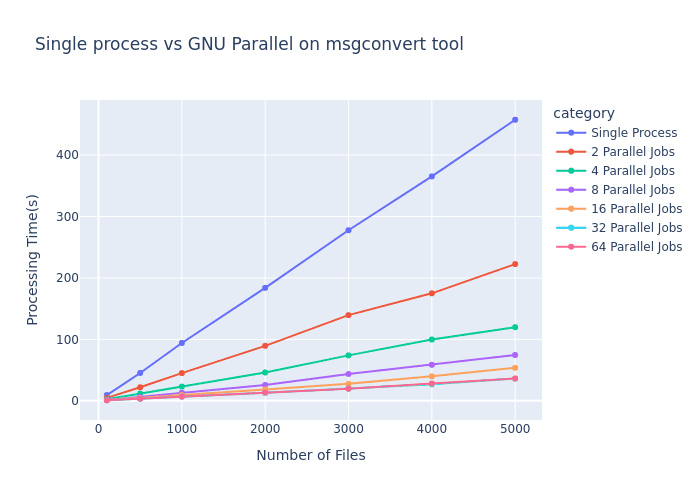
As shown in the graph, the performance gains follow Amdahl's Law, where:
Single process performance (blue line) scales linearly with input size, reaching ~450 seconds for 5000 files
Adding parallel jobs dramatically reduces processing time
The improvement follows a diminishing returns pattern as we increase parallelism
The most significant observations:
2 parallel jobs cut processing time roughly in half
4 parallel jobs reduced time to approximately 25% of single-process performance
8 parallel jobs achieved nearly 6x speedup
16-64 parallel jobs showed continued but diminishing improvements
Hardware Constraints and Efficiency Limits
The benchmark reveals an important practical consideration: hardware limitations establish an upper bound on parallelism benefits. Note how the lines for 32 and 64 parallel jobs nearly overlap, indicating we've reached the parallelization ceiling for this workload on the test hardware.
This plateau occurs due to several factors:
CPU core count: Once jobs exceed available cores, performance gains diminish
I/O bottlenecks: As parallel processes compete for disk access
Memory constraints: Available RAM must be shared across all processes
Scheduling overhead: Managing many processes introduces its own overhead
Cross-Platform Consistency
While these benchmarks specifically measure GNU Parallel performance, similar scaling patterns emerge when using Python's multiprocessing library and PowerShell's RunspacePool. The fundamental performance characteristics—initial linear scaling followed by diminishing returns—remain consistent across all three implementations, though the exact efficiency curve varies based on implementation details.
For optimal performance across any platform, these results suggest configuring parallelism to match your hardware capabilities—typically setting job count to match or slightly exceed your CPU core count provides the best balance of performance gain versus resource consumption.
Takeaways
Our journey through parallel processing implementations reveals crucial lessons for AI practitioners working with real-world data:
Start simple but scale smartly: Begin with accessible parallelization tools before investing in complex distributed systems—the speedup from basic parallel processing often provides sufficient performance gains for million-scale datasets.
Hardware-aware optimization: Configure parallelism to match your hardware capabilities—typically matching job count to available CPU cores provides the optimal balance between performance and resource consumption.
Separate processing from storage: Structure workflows to process data in parallel but save in efficient batches using transactions, addressing both computation and I/O bottlenecks.
Language-agnostic principles: Whether using GNU Parallel, Python's multiprocessing, or PowerShell's RunspacePools, the fundamental scaling patterns remain consistent, allowing cross-platform implementation.
In the age of Generative AI, where model quality depends directly on data quality, these parallelization techniques serve as the unsung heroes of AI development pipelines. By reducing data processing time from weeks to days, they enable faster iteration cycles, more experimental approaches, and ultimately better AI solutions—keeping pace with the rapidly evolving GenAI landscape without requiring enterprise-scale infrastructure investments.